Computer Networking
Insights from My First Week Exploring Computer Networking
📚 Avid reader | ⚡ Percy Jackson fan 👨💻 Learning backend development | Currently working with Python 🤝 Here to share, help, and grow with the dev community 🛤️ Follow my journey as I learn, build, and explore the backend world!
🔹 Part 1: The Core Foundation – What is the Internet?
🌐 The Internet: More Than Just a "Cloud"
The internet is a global "network of networks" that allows computers to communicate with each other. In simple terms, it’s the infrastructure (wires, routers, satellites) that lets devices exchange data across the globe.
💡 In my understanding, the internet is the wire that connects multiple systems to share information, files, and other kinds of data. It gives access to the whole world from your own device.
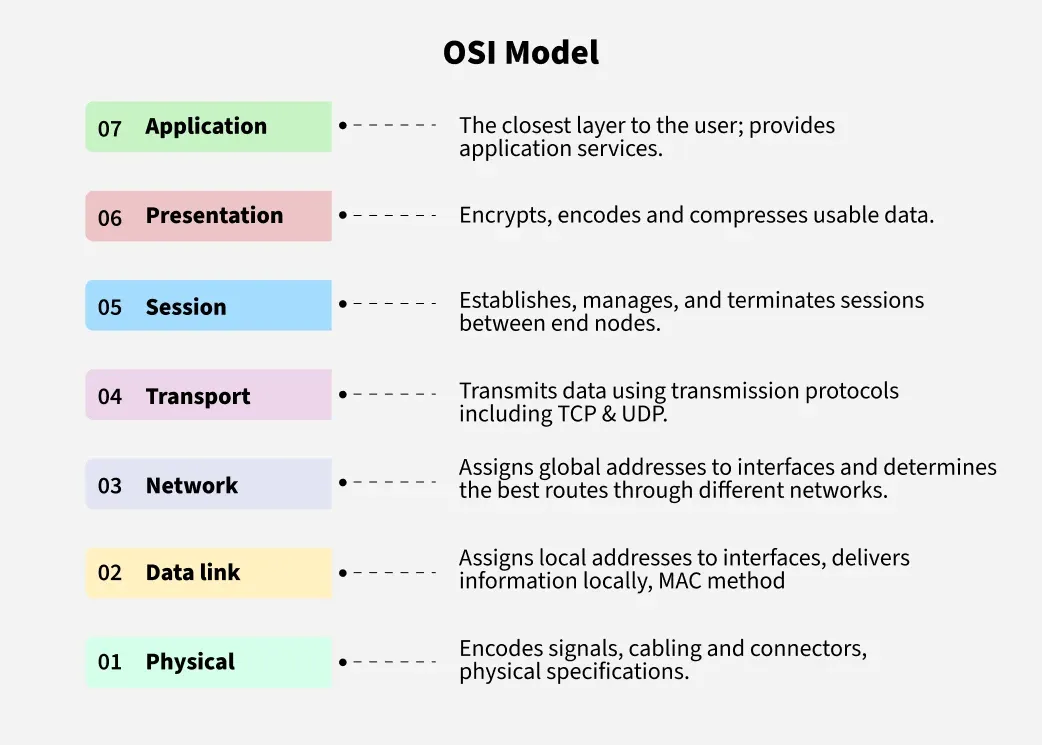
The OSI Model: 7-Layer Network Blueprint
The OSI (Open Systems Interconnection) model is a conceptual framework used to understand how different networking protocols interact in a layered manner.
Layers Overview:
Layer 7: Application – Interfaces like HTTP, DNS, etc.
Layer 6: Presentation – Encryption, compression, character encoding.
Layer 5: Session – Establishing and managing sessions.
Layer 4: Transport – TCP/UDP manage delivery, ordering, reliability.
Layer 3: Network – IP addressing and routing.
Layer 2: Data Link – MAC addresses and local data transfer.
Layer 1: Physical – Cables, radio waves, electrical signals.
Encapsulation and Decapsulation
Each layer adds a header to the data (encapsulation) when sending and removes it (decapsulation) when receiving. This process enables smooth communication between devices regardless of hardware or OS.

🔹 Part 2: The Data’s Journey – From You to the Server
🏠 Local Network Basics
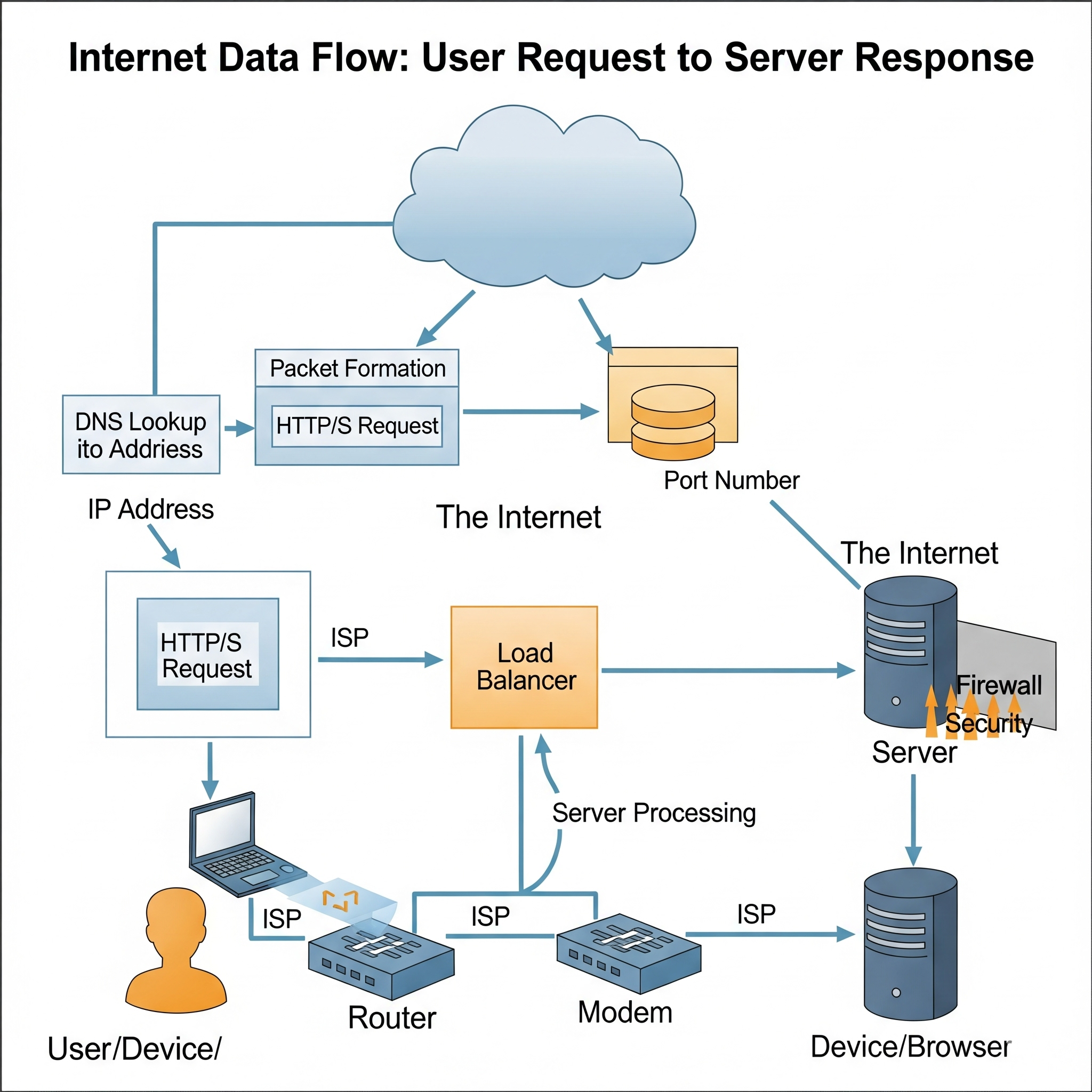
The journey begins when you type a website address in your browser. Your browser generates an HTTP request, which is passed through your operating system to the network stack, then sent over Ethernet or Wi-Fi to your router.
The router sends the request to the modem, which converts the signal into a format suitable for transmission via cables or fiber optics.
The DNS lookup occurs to translate the domain name into an IP address.
Your device encapsulates the HTTP request into a TCP/IP packet and sends it through the network.
Key Concepts:

Router vs. Modem
Ethernet vs. Wi-Fi
LAN (Local Area Network) vs. WAN (Wide Area Network)
🌍 ISP & Public Internet
The modem, provided by your Internet Service Provider (ISP), converts digital signals to analog (or optical) and routes your request to the ISP’s infrastructure. The ISP then connects to higher-level networks to forward your request to the destination server.
NAT (Network Address Translation): Translates private IPs (e.g., 192.168.x.x) into your public IP.
Subnets & Gateways: Logical divisions of IP addresses and routing control within networks.
🧭 IP Addresses & Port Numbers
The Internet Protocol(IP) address is the address of your modem which helps the internet locate you and the port number is the address of the application/web browser which called the HTTP request.
IPv4 vs. IPv6
Port numbers and common examples (80, 443, 22)
Socket = IP + Port
🌐 Domain Names & DNS
Domain Names (like www.google.com) are user-friendly labels that point to IP addresses. Since IPs are hard to remember, we use the Domain Name System (DNS) to convert names to addresses.
DNS Resolution Process:
Local DNS Cache is checked first.
If not found, a recursive query is sent to the DNS Resolver (usually provided by your ISP).
If the resolver doesn’t have the answer:
It starts iterative queries through the DNS hierarchy:
- Root Server → TLD Server (e.g.,
.com) → Authoritative Server
- Root Server → TLD Server (e.g.,
The resolved IP is cached with a TTL (Time-To-Live) to speed up future lookups.

Types of DNS Queries:
Recursive: The resolver finds the full answer for the client.
Iterative: The resolver asks step-by-step, getting referrals.
Non-Recursive: Used when the resolver already has the answer cached.
🏠 What is Hosting?
Once the DNS resolution is complete, your browser knows the IP address of the hosting server.
Hosting is the process of storing your website or application files on a server that is connected to the internet 24/7. That server could be:
A shared hosting server (multiple sites on one server)
A dedicated server (entire server for one website)
A cloud instance (e.g., AWS EC2, Azure VM)
The hosting server listens for incoming HTTP requests and serves back responses like HTML, images, and JSON data.
🌐 What Happens When You Type a URL in Your Browser?
This ties everything together. Here's a step-by-step breakdown:
You type a URL like
https://example.comin your browser.Browser checks DNS cache or queries a DNS server to resolve
example.comto an IP address.Browser initiates a TCP connection (or QUIC in HTTP/3).
If HTTPS is used, TLS handshake ensures a secure connection.
Browser sends an HTTP GET request to the server.
Server responds with HTML, which is parsed and rendered.
Additional resources (CSS, JS, images) are fetched as needed.
Browser renders the page visually.
🔹 Part 3: Speaking the Web’s Language – HTTP/S
🔤 HTTP/S Basics
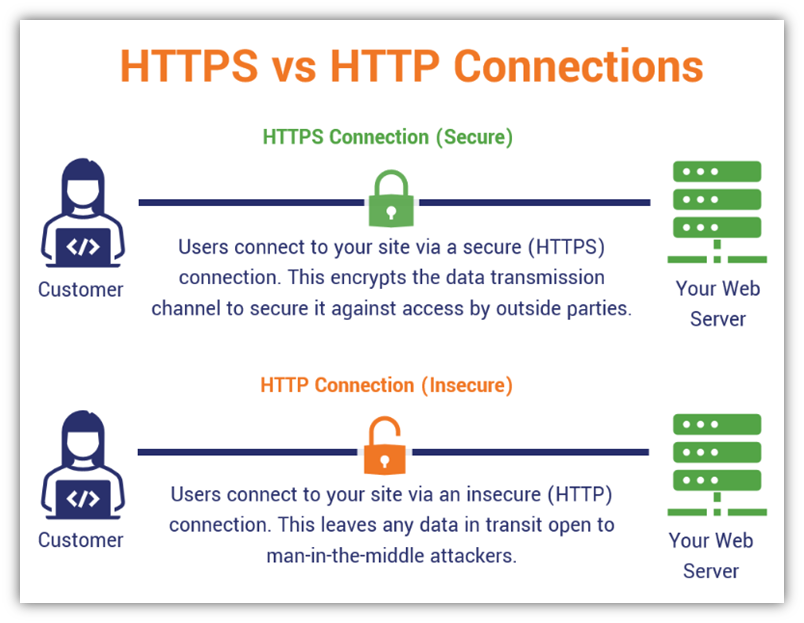
Hypertext Transfer Protocol (HTTP) is an application-layer protocol that enables communication between clients (typically browsers) and servers. It is stateless, meaning each request is independent of previous ones.
HTTPS is the secure version of HTTP, using TLS (Transport Layer Security) to encrypt data during transmission. This is crucial for protecting sensitive information like passwords, financial details, and personal data.
| Feature | HTTP | HTTPS |
| Secure | ❌ | ✅ (Encrypted via TLS) |
| Protocol Type | Stateless | Stateless |
| Use Cases | Public content | Sensitive data, authentication |
Common HTTP Methods:
GET: Retrieve a resourcePOST: Submit data (e.g., form submission)PUT: Update or replace a resourceDELETE: Remove a resource
Common HTTP Status Codes:
200 OK: Request succeeded404 Not Found: Resource does not exist500 Internal Server Error: Server-side failure
HTTP Headers:
Headers provide metadata (e.g., content type, cache-control, cookies, authentication tokens) for requests and responses.
🚀 Evolution of HTTP Versions
HTTP has evolved significantly to meet performance, scalability, and user experience demands. Below is a breakdown of its major versions:
HTTP/1.0 – One TCP Connection Per Request
Each resource (HTML, CSS, image) requires a separate TCP connection.
Leads to latency due to repeated TCP three-way handshakes (
SYN,SYN-ACK,ACK).No Host header: Servers couldn't host multiple domains on a single IP.
Inefficient for modern websites with many assets.
HTTP/1.1 – Keep-Alive, Pipelining
Introduced persistent connections with the
Connection: keep-aliveheader.Allows multiple HTTP requests over a single TCP connection.
Enabled pipelining: multiple requests sent without waiting for previous responses.
✅ Improvements:
Lower latency
Supports virtual hosting (with the Host header)
🚫 Limitations:
Head-of-Line Blocking (HOLB): If one response is delayed, all following responses wait.
Still a text-based protocol, inefficient for parsing.
No request prioritization (all requests treated equally).
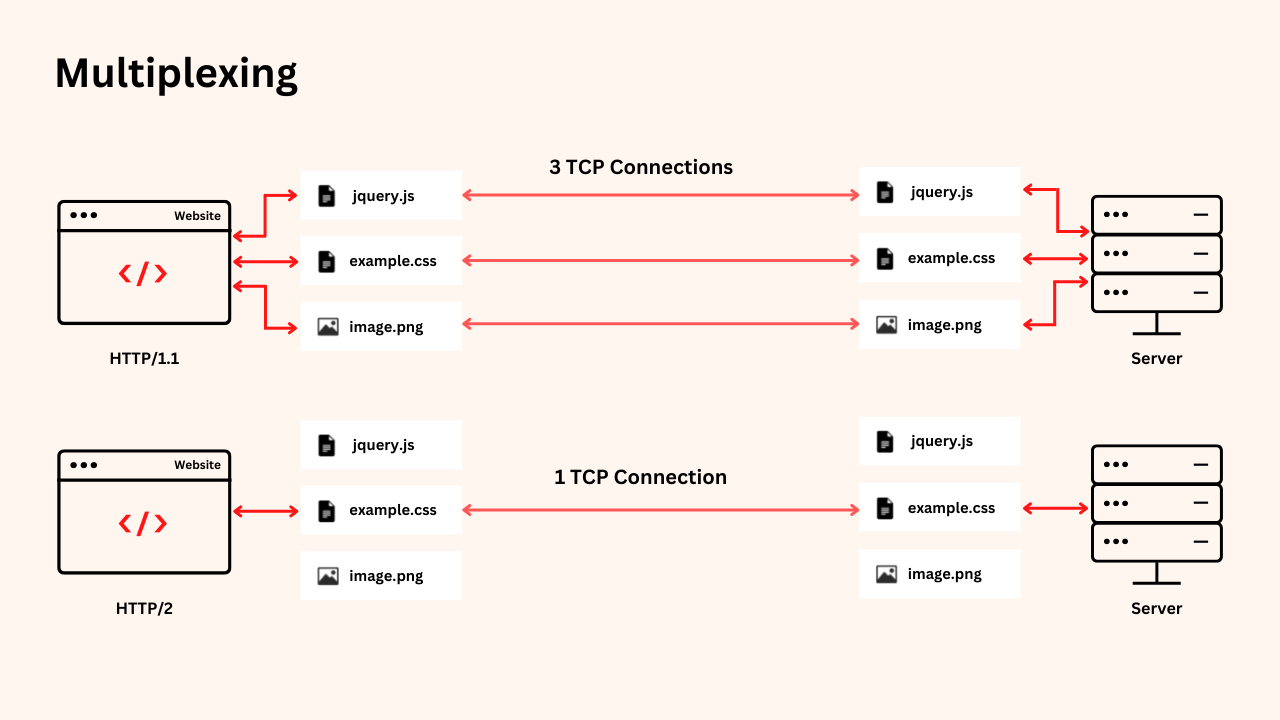
HTTP/2 – Binary Framing, Multiplexing, Header Compression
HTTP/2 brought a major performance leap by introducing a binary protocol instead of textual.
Key Features:
Multiplexing: Multiple requests and responses are interleaved over a single TCP connection without blocking each other.
HPACK Compression: Reduces size of redundant headers.
Server Push: Server can proactively send resources it anticipates the client will need.
Stream Prioritization: Clients can assign weights to resource loading (e.g., prioritize CSS over images).
🚫 Still relies on TCP, so suffers from TCP-level HOLB: If a single packet is lost, all streams stall while TCP retransmits.
HTTP/3 – Built on QUIC (UDP-Based Transport)
HTTP/3 is the latest evolution, designed to solve TCP’s fundamental issues, especially over mobile or lossy networks.
Built on QUIC, which runs over UDP, HTTP/3 integrates both transport (like TCP) and encryption (like TLS) within a single layer.
✅ Key Advantages:
No TCP HOLB: Each stream is independent, so one lost packet doesn't block others.
0-RTT and 1-RTT TLS Handshake: Fast connection setup, especially for returning users.
Connection Migration: QUIC uses a Connection ID instead of IP+Port, enabling smooth transitions when switching networks (e.g., Wi-Fi to mobile data).
| Feature | HTTP/1.1 | HTTP/2 | HTTP/3 |
| Connection Type | TCP | TCP | QUIC over UDP |
| Multiplexing | ❌ | ✅ | ✅ |
| HOL Blocking | App-level | TCP-level | ❌ |
| Handshake Speed | Slow | Faster | Fastest (0-RTT) |
| Security | TLS (separate) | TLS (separate) | Built-in TLS |
🔹 Part 4: Backend Networking Deep Dive
🔄 TCP vs. UDP in Practice

At the transport layer, data can be sent using TCP or UDP, depending on the trade-off between reliability and speed.
TCP (Transmission Control Protocol):
Connection-oriented (requires a handshake: SYN → SYN-ACK → ACK).
Reliable: Ensures delivery, ordering, and error checking.
Slower but guarantees data integrity.
Flow and congestion control (e.g., TCP window size).
Common use cases: HTTP/HTTPS, FTP, SSH, database connections.
UDP (User Datagram Protocol):
Connectionless: No handshake or delivery guarantee.
Faster, lightweight, and low-latency.
Packets may be lost, duplicated, or arrive out of order.
No congestion or flow control.
Use cases: DNS, video streaming, voice calls, online gaming.
✅ Real-world example: DNS uses UDP for speed; HTTP/3 uses QUIC over UDP to combine speed and reliability.
🔌 Sockets & Network Programming
A socket is a software abstraction representing an endpoint for network communication — either on the client or server side.
Core Functions:
bind(): Assigns a socket to a local IP address and port.listen(): Marks a socket as a server, waiting for connections.accept(): Accepts incoming client connection requests.connect(): Initiates a connection from the client to the server.send()/recv(): Used for data transmission after a connection is established.
Blocking vs. Non-Blocking I/O:
Blocking I/O: Code execution halts until the operation completes.
Non-blocking I/O: Uses polling, callbacks, or async frameworks to allow other operations while waiting (important in scalable backend systems).
🚀 In backend development, understanding socket behavior helps when using frameworks like Node.js (event loop), Python's asyncio, or Java NIO.
🖥️ The Client-Server Model

The client-server model is foundational to modern networking and backend architecture.
The client (e.g., browser, mobile app) sends a request.
The server processes the request and returns a response.
Statelessness of HTTP:
- Each request is independent; servers don’t retain information about previous requests.
Managing State:
To handle user-specific data (like sessions), state is managed via:
Cookies: Stored in the client’s browser and sent with each request.
Sessions: Server stores state (e.g., in Redis) using a unique session ID.
JWT (JSON Web Tokens): Encodes session data on the client-side, allowing stateless authentication.
✅ Example: Login tokens, shopping carts, and user preferences rely on session management.
📡 APIs: Communication Between Services
APIs (Application Programming Interfaces) allow machines to communicate using agreed-upon protocols and formats.
RESTful APIs (most common):
Operate over HTTP/HTTPS.
Represent resources via URIs (e.g.,
/users/123).Use standard methods:
GET,POST,PUT,DELETE.Return data typically in JSON format.
Modern Alternatives:
GraphQL: Allows clients to query exactly the data they need. Reduces over-fetching and under-fetching.
gRPC: A high-performance RPC framework by Google. Uses HTTP/2 and Protocol Buffers (binary format) for fast and efficient communication.
| Feature | REST | GraphQL | gRPC |
| Protocol | HTTP | HTTP | HTTP/2 |
| Format | JSON | JSON | Protocol Buffers |
| Flexibility | Fixed endpoints | Flexible queries | Strongly typed, contract-based |
| Performance | Moderate | Moderate | High |
🔹 Part 5: Bonus – Browser Internals & Optimization
🔍 How Do Browsers Work Internally?
After receiving an HTTP response (usually HTML), the browser follows this process:
HTML Parsing → Creates a DOM Tree (Document Object Model).
CSS Parsing → Creates a CSSOM Tree (CSS Object Model).
DOM + CSSOM → Render Tree
Layout: Calculates the positions of elements on the screen.
Paint: Draws pixels on screen.
Composite: Layers are combined for display.
Modern browsers optimize rendering via lazy loading, preloading, and asynchronous script execution.
Browsers also handle:
Caching (localStorage, cache-control)
Security (CORS, CSP headers, sandboxing)
DevTools for debugging

🔹 Part 6: Boosting Performance – CDNs & Asset Delivery
⚡ What is a CDN?
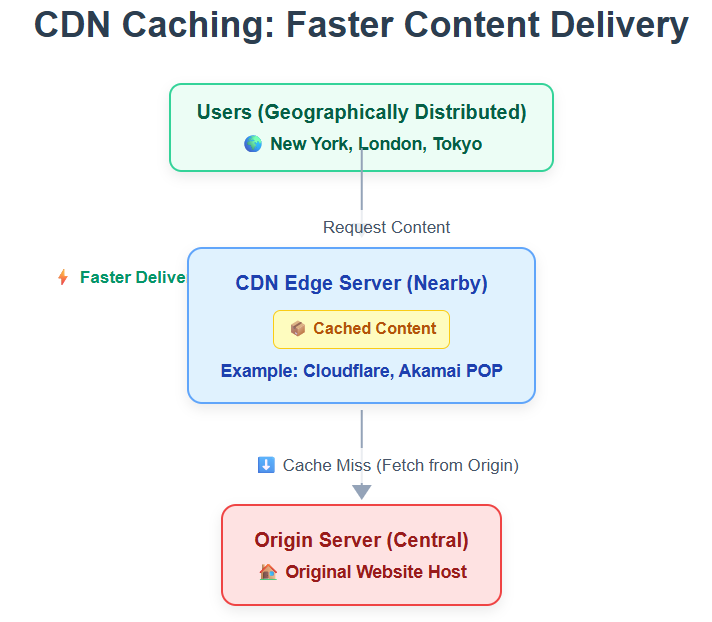
A Content Delivery Network (CDN) is a globally distributed network of edge servers that cache static assets (images, CSS, JS, videos) closer to users.
Benefits:
Reduced latency due to geographic proximity.
Offloads traffic from your main server.
Improves page load speed and reduces TTFB (Time To First Byte).
Common CDN Providers:
Cloudflare
Akamai
AWS CloudFront
Fastly
Use Case:
When you load a website, images and stylesheets are often served from a CDN rather than your backend server to reduce load time.
Resources :::
Conclusion:
That’s all from my side this week . Some things I will convey before closing are:-
Read but implement too for better understanding.
If possible make simple projects like creating an HTTP API, hosting on cloud, etc.
Stay consistent! That’s where I procrastinated
So, all the best for your learnings and happy reading.

